Add SysAdmin Account
You must add a SysAdmin user with root permissions on the Service Provider OVOC VM machine to perform the following actions:
|
■
|
Live Platform Operation Center portal Global Setup (see Global Setup) |
For configuration on the Microsoft Azure platform, ensure that you have Global Admin permissions for both the Main Tenant and Service Provider operator tenant platforms.
|
1.
|
Login into the OVOC server by SSH, as ‘acems’ user and enter password acems. |
|
2.
|
Switch to 'root' user and provide root password (default password is root): |
su - root
|
3.
|
Type the following command: |
# OvocServerManager
|
4.
|
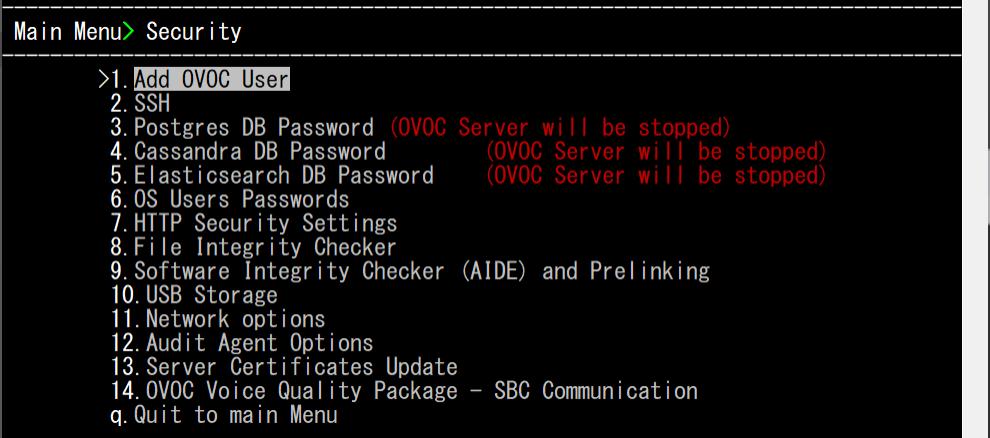
From the OVOC Server Manager root menu, choose Security and then press Enter. |
|
5.
|
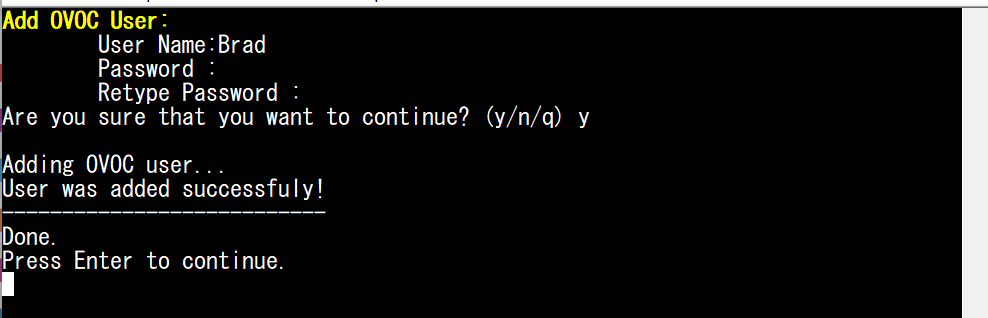
Press option Add OVOC User and follow the prompts. |